
A lot of this release came straight from what you told us: in reports, on Discord and in the videos you made. Thank you. It is about seeing the field clearly, being understood the first time, and a frequency that lets you finish a sentence.
The ground radar, clearer
Taxiways are drawn at their real width with a centre line. A free stand shows a green ring and a taken one is dimmed, and the stand an aircraft is going to is ringed on the map and named on its strip. Aircraft are small aircraft now, seen from above and pointing the way they are heading.
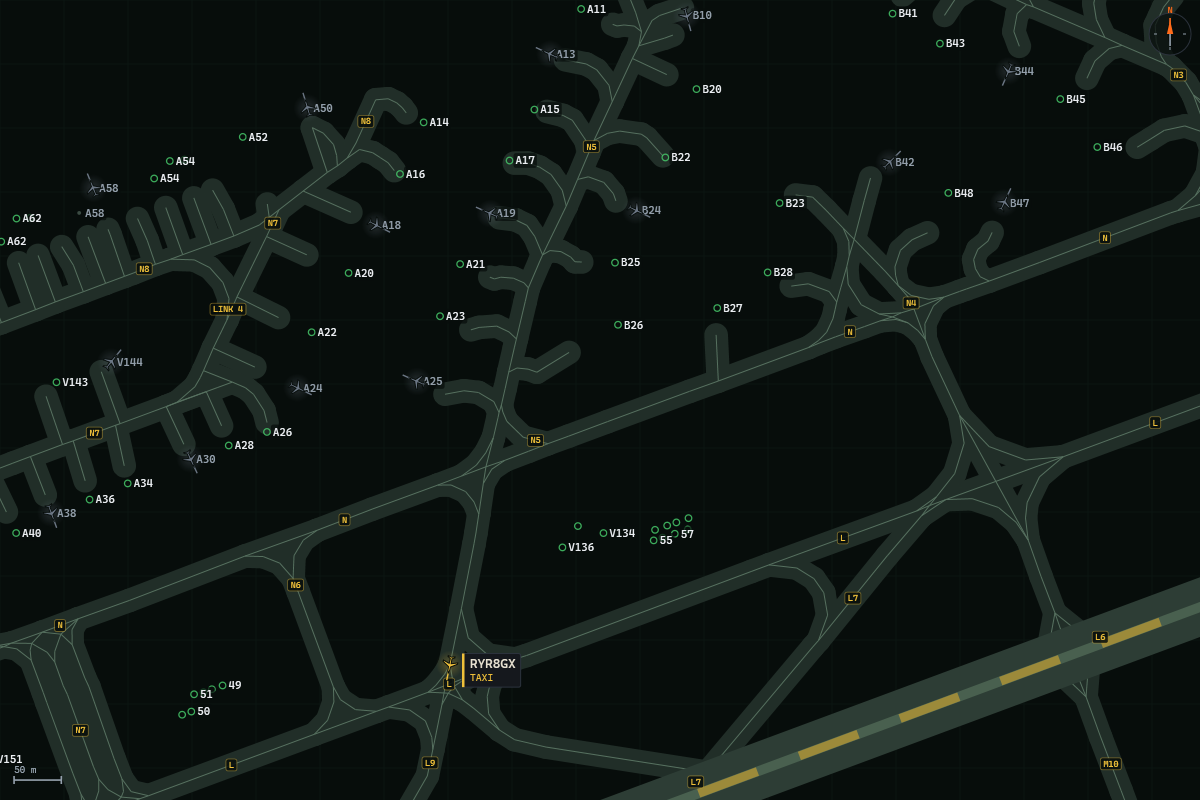
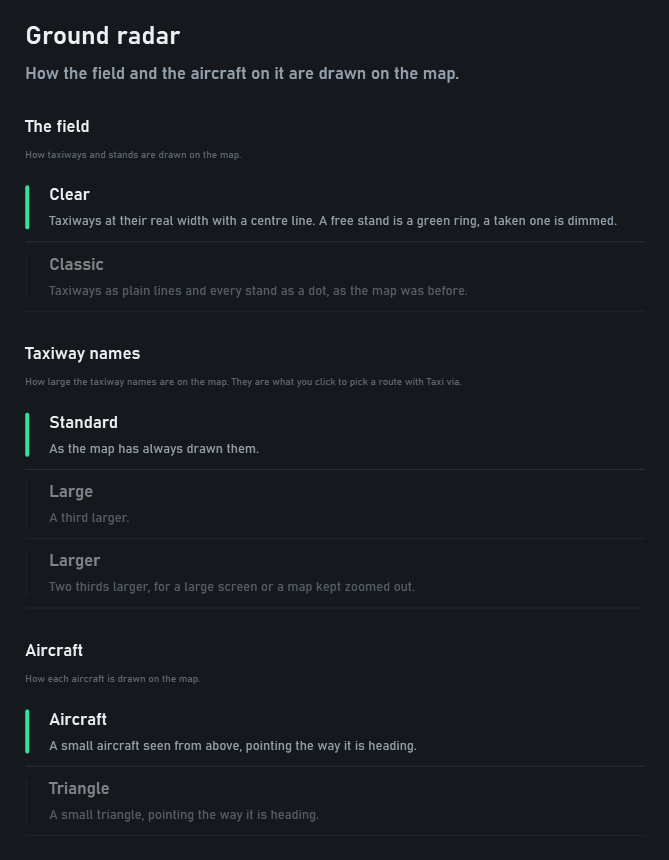
The classic look, the triangle and larger taxiway names are in Settings, Ground radar. Where the scenery leaves a gap in a taxiway, the way Airside taxis across it is drawn dashed.
Pick a taxi route
Press TAXI VIA… on the selected aircraft and click the taxiways you want on the ground radar, on the pavement or on a name. Then click where it is going: a stand for an arrival, the end of its runway for a departure. As you click, one line shows the route the aircraft will take, and where what you picked cannot be joined up, the map says why.
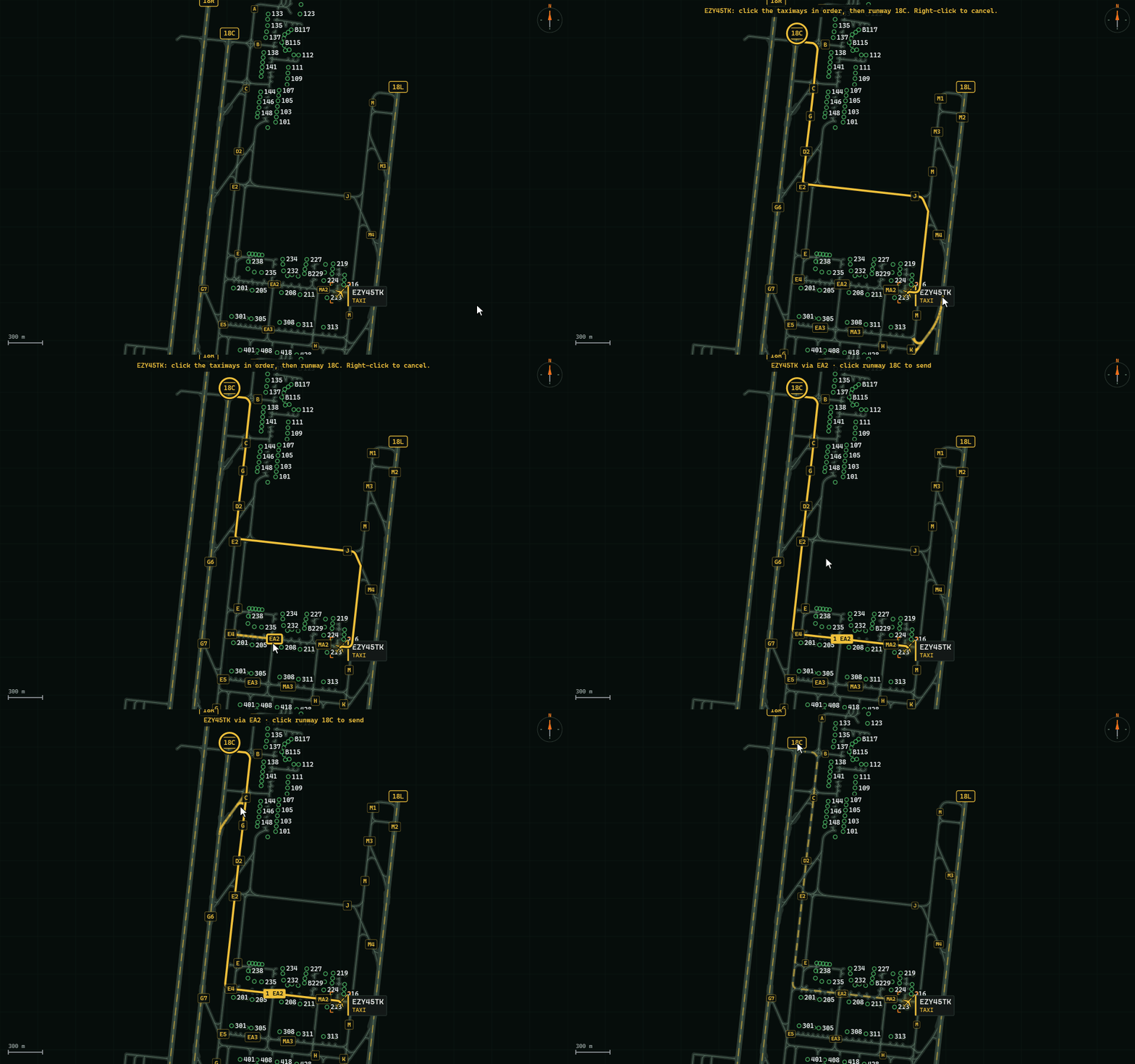
- Pick only the ones that matter. The aircraft finds its own way between them.
- A stand is one click. Click a stand with nothing picked and the arrival goes there the shortest way. TAXI VIA… takes the place of ASSIGN GATE, and the taxi button now reads TAXI TO RWY.
- Change your mind. Click a taxiway again to take it out. Drag to move the map, right-click to leave.
- By voice it is "taxi via Alfa Bravo" as before, and now also "taxi to stand two one one via Alfa Kilo".
- At an airport that publishes no taxiway names, you draw the route along the taxiways instead.
One crew at a time
A crew that has called you is owed an answer. Its strip says AWAITING YOUR ANSWER and is the first in the list, and no other crew starts a call until you have answered it. When you give an instruction, that crew reads it back before anybody else speaks.
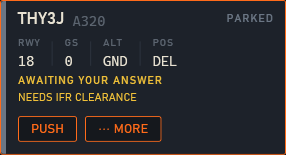
- Stand by is an answer. Say it, or press STAND BY on the aircraft. The crew answers "standing by", gives you five minutes, and the next crew may call.
- Nobody talks over you. While your talk key is down every crew waits, and their calls come in order once you let go.
- Fewer repeats. Requests made again are spaced out. A departure sent to Tower does not call again at the holding point, and one told to contact departure stays quiet in the climb.
- A quieter frequency, if you want one. In Settings, AI crew, ready calls ("ready for departure", "lined up, ready") and reminders can be switched off.
Voice or click, whenever you like
How you work the desk is no longer a question on the setup screen. It is a switch in the top bar, VOICE | CLICK: change it at any moment, for instance when your voice wants a rest, and the desk opens the way you left it.
Aircraft that move like aircraft
- Smooth at busy airports. Aircraft move evenly, also with the double-click camera following one, and the desk stays responsive while the traffic is worked out.
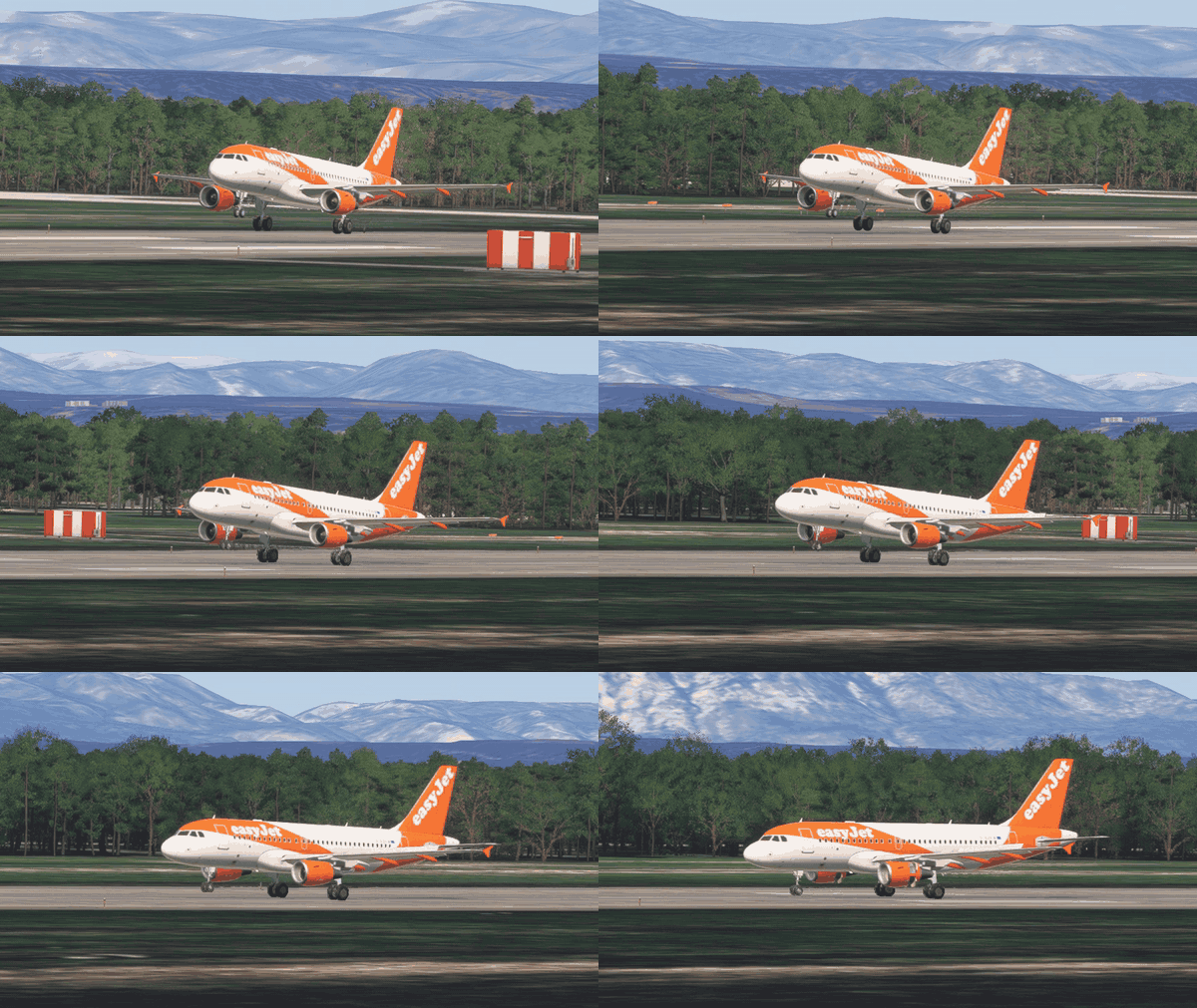
- Engines start one after the other on the push.
- Reverse thrust opens on the landing roll, on the models that have it.
- The nose wheel turns with the aircraft, in a turn and on the push.
Understood on the frequency
- The name on the tail. More than forty operators answer to the name people know as well as to their radio callsign: Ryanair UK is Blue Max on the radio, Pegasus is Sunturk, Jet2 is Channex and British Airways is Speedbird.
- Cleared before the holding point. "Cleared for takeoff" or "line up and wait" while a departure is still taxiing is kept, and done at the runway without stopping. A runway still to cross comes first.
- Conditional line-ups and crossings, however you name the traffic: "after the landing 737, line up and wait", or "give way to the landing 737, line up and wait behind".
- "Follow company." The crew follows the aircraft of its own airline taxiing near it.
- Stands, said every way. "Taxi to stand two one one via Alfa Kilo" is taken with its route. "Taxi to stand" with no number sends an arrival to its planned stand, or to a free one that fits. "Stand three" finds 3L or 3M, and "stand five four left" is 54L.
- A new route on the move. "Taxi via Papa" or "continue taxi via Papa" to an aircraft already taxiing is followed from where it is, also when the route begins with the taxiway it is on.
- "Readback correct." With Ground handed to Airside, your last word to a departure after its clearance ends the exchange, with a frequency to contact if you give one.
- Immediate takeoff from the taxiway lines up first, and "fly the standard missed approach" is a go-around.
- Crews say "four" clearly.
The desk
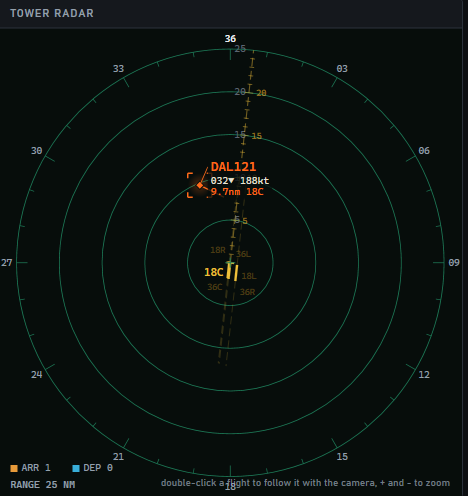
- Tower radar. The radar of inbound traffic is TOWER RADAR now, and it draws the runways to scale with their numbers.
- Traffic. Four steps beside Realistic: Quiet, Steady, Busy and Peak, at 3, 6, 12 and 18 landings an hour on one runway. A desk that was set to Bank opens on Peak. A few more aircraft stand at their gates when a shift opens.
- Ground vehicles. Settings, Ground service: Shown, or Not shown. Not shown, no truck, stairs, bus or tug is drawn in the simulator, and the handling takes the same time.
- Time played. Settings shows how long you have worked the tower.
- Sign out. Signed in with the wrong e-mail address? Settings, Account has SIGN OUT: Airside closes, and its launcher asks for your address again.
- Crossings by Airside's Tower. When Airside works Tower, an aircraft waiting to cross a runway in use says so on its panel and in its menu, with how to take it.
Your sound and your microphone
- Microphone and speakers. Choose your microphone and your speakers or headset in Settings, Radio, and test them there. Automatic tries each microphone in turn, and one that will not open is named with the reason.
- If the crews cannot be heard, Airside says why on the screen. If their voices go to a virtual sound device you did not choose, the radio log names it. Missing voice files are fetched again at the next start.
- Speech recognition on your graphics card. If it is slow there, Airside moves it to the processor with the small model and keeps that choice. If it cannot start there, Airside listens on the processor and tells you why; choose Graphics card in Settings, Radio to try it again.
- The crew voice. Settings, AI crew says why it is not running, when it is not.
- Altimeter setting in hectopascals or in inches, in Settings, Radio.
On the ground and on the runway
- Departures enter the runway where the airport publishes it. They hold at the marked holding point and line up along the taxiway, at more airports.
- Only the paved runways. Where an airport has a paved runway, the ones the simulator lists as grass, dirt, sand or water are no longer drawn or used. At Edwards that is the two concrete runways, not the nine on the lakebed.
- Runway crossings on the way out are made where the airport draws them, and held short of, at more airports.
- Two aircraft at one crossing from opposite sides cross one after the other, and two nose to nose on a position Airside works are given an order.
- A rejected takeoff rolls to the next turn-off and leaves the runway there.
- Landings leave on their stand's side where a turn-off there is a short roll further on, and a turn-off you name is taken.
- A runway change reaches the arrivals. One still far out moves to the new runway, and one sent around comes back for the runway in use.
- Airside's Tower leaves room for a long line-up before the next landing.
- A crew that cannot continue its taxi on Airside's Ground is put on your board.
Smaller things
- ChasePlane. Where it is installed, Airside leaves the simulator's camera to it and says so once. Settings, Camera has the switch for when you turn ChasePlane off.
- Liveries. United, American and Lion Air fly in their own paint, and Virgin Australia and Rex with their own aircraft.
- Live traffic. Flight numbers are right for easyJet, Wizz, JetBlue, Frontier, Aegean, Volotea and other airlines whose code has a figure in it. American carriers fly numbers, never a lettered callsign. More aircraft types are recognised.
- Installing. A download the line cuts continues where it stopped, a disk without room is named before anything downloads, and Windows shows Airside's full size.
- A long ATIS scrolls on its card. The top bar and the strip tabs fit a narrow window, and every page of Settings can be reached on a small screen. After a tutorial lesson the strip list stays where it is.
Thank you, supporters
Klaus and sr7x: your names are in Settings, Credits, from this version on. Five more of you support Airside and are not named yet. Tell us the name you would like there, on Discord or at info@airsideatc.com.
How to update
Open Airside from its launcher. It installs everything in one start.