
Airside 0.7.14.0 lights a red stop bar at every runway holding point, gives your clicks a voice on the frequency, and lets a spotter choose which frequencies to hear. On the ground, two aircraft stuck nose to nose no longer stay stuck when one of them can pass.
Supporters first
Supporters have 0.7.14.0 today. Everyone else gets it on Friday 6 November at 15:00 UTC.
Stop bars
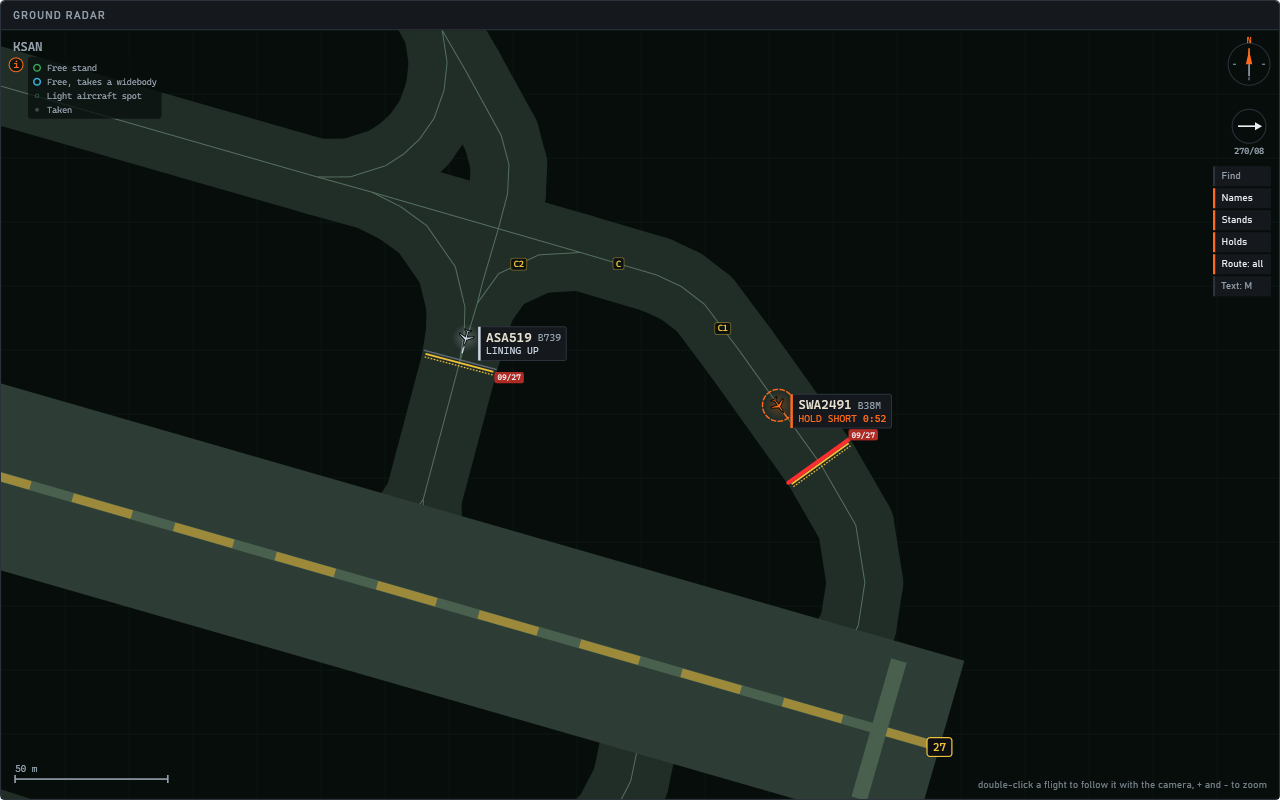
- A red stop bar at every runway holding point, lit all the time, on the ground radar. It grows thicker as you zoom in.
- Your clearance switches it off. A line up, a takeoff or a crossing darkens that aircraft's bar, and the bar lights again once the aircraft is past.
- Click a bar to switch it off or on. A dark bar is not a clearance: nobody goes without one.
- Light it again in front of a cleared aircraft, and the aircraft stops at the bar, keeps its clearance and says "stop bar still lit". Switch the bar off and it carries on. A new line up or takeoff given while the bar is lit waits for the bar too.
- Arrivals that cross a runway after vacating stop at their bar as well.
A voice for your clicks
- ATC voice. In click mode, what you click is said on the frequency in a controller's voice, and crews answer once it has finished. Choose Michael, Sarah or Off in Settings, Audio. Crew speaking speed sets its pace too.
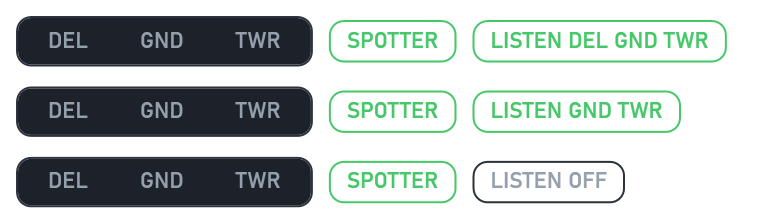
- Listen as a spotter. Leave all three positions to Airside and LISTEN appears beside SPOTTER: hear Delivery, Ground and Tower, any of them, or none. Each exchange is heard on its own frequency, readbacks included.
Handoffs
- Spoken handoffs are on for everyone. Crews wait for you to hand them on: "contact Ground" once the clearance is read back, "contact Tower" as they near the holding point, and "contact Ground" once the runway is vacated. A note says so once when 0.7.14.0 opens. To switch it off: Settings, Crews, Spoken handoffs.
- An early "contact Ground" is kept. Given to a landing aircraft on its roll, it changes to Ground as it turns off, without asking.
- A landing aircraft you have already given a stand, a taxi or a crossing no longer reports "runway vacated" as well.
- After a handoff, the first call on the new frequency comes a few seconds later, the time it takes a crew to read back, change over and listen.
- Working Ground and Tower yourself, a crew you gave its pushback or its taxi is yours on Ground without asking to be handed over.
- At US airports, a "contact Tower" given with a crossing counts for that crossing, and the handoff before the departure runway is asked for again. Crews there read a frequency with "point".
The radio
- "Final approach speed" and "approach speeds" are understood as a speed instruction.
- "Readback correct" with no callsign, right after a readback, counts for that crew.
- "Taxi stand 25 via C, cross runway 02R" keeps the stand and the route, not only the crossing.
- "Turn left on J" is read the way the map shows the turn, on either side of the junction.
- The tutorial no longer stops in its landing chapter in click mode.
On the ground
- Two aircraft stuck nose to nose: if one can pass the other with its wingtip clear, it does. With Airside working every position, Frankfurt's busiest days now move a quarter more departures.
- An aircraft that should go first, but has waited five minutes behind the one meant to give way, passes it the same way.
- At a runway crossing, the aircraft stops with its nose on the scenery's holding line, or, where the scenery draws none, 80 m from the centre line as before.
- The taxiway you name is followed until the route has to leave it: "via A1" means along A1.
- A route you name that begins behind the aircraft's nose is reached by taxiing forward and round, or the crew says at once that it cannot get onto it.
- At a junction, the aircraft giving way waits clear of it until the other has passed.
- When Airside's Ground sends the first aircraft of a queue round, the ones behind it go the same way.
- At Frankfurt, a departure waits at the start of a landing's way off the runway while the landing comes in.
- Helsinki's 15/33 is crossed straight and with a clearance, Malpensa's DE to DA no longer turns back on the runway, and pushbacks no longer swing toward the next stand (Lisbon and others).
Go-arounds and landings
- Fewer go-arounds for "traffic on the runway". An aircraft waiting to cross back over the runway it has just left no longer counts as on it (Gatwick).
- Airside's Tower no longer lines up two departures on one runway in the same second.
- Landings brake softly, firmly or hard: hard when you name the turn-off, or to make the one planned.
The ground radar and the screen
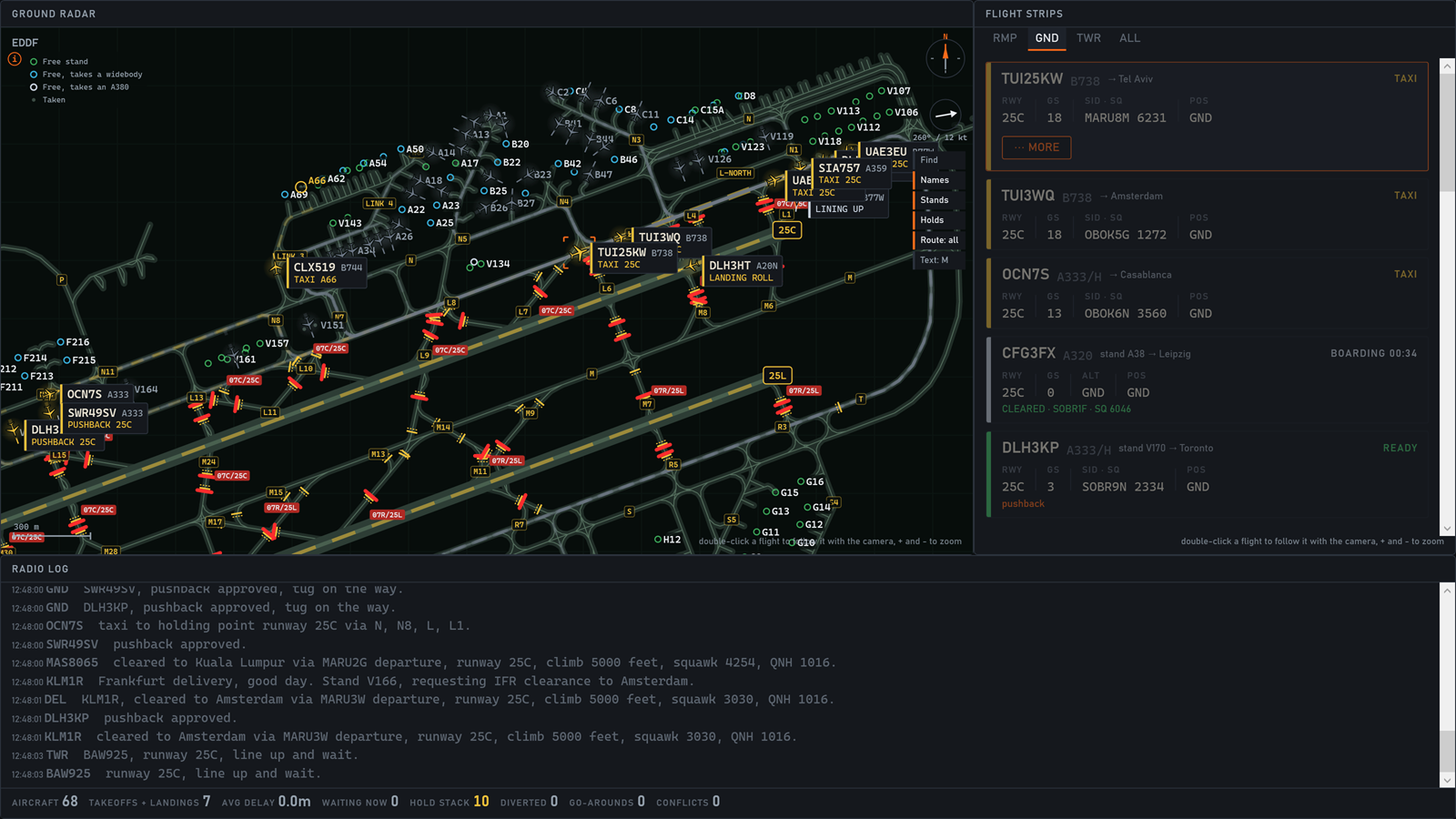
- Strips by position: RMP, GND, TWR and ALL. TWR carries everything on the tower's frequency: departures from 400 m before the holding point until "over to departure", and arrivals from their call on final until they vacate.
- A strip on the ground radar. Find, Names, Stands, Holds, Route (all, one or off) and Text sit on its right, one press each, and what you choose is kept for your next shift.
- Find, or Ctrl+F. Type a callsign, a stand, a taxiway or a runway and take it with the arrows and Enter: the radar brings it to the middle, close enough to read, and rings it for three seconds, and a flight you take is selected too.
- A click on the field says what is there. A stand gives the wingspan it takes and who is on it or whether it is free, a holding point the runway it guards, a taxiway its length and width, and a runway's end its length, heading and the wind along and across it.
- Holding points on the map. Each is drawn as its painted line, with a red sign for the runway it guards when you zoom in, and the selected aircraft's next one is lit in orange.
- The tag says more. It shows the type, where the aircraft is going (an arrival's stand, a departure's runway) and, in orange, how long it has waited for you, and an aircraft waiting for you is ringed.
- Text: M, L or XL writes taxiway names, stand numbers and holding point signs larger together.
- Airside's cameras ease to a stop like the simulator's: the mouse and the keys in the tower and runway views, and the drag and the wheel around an aircraft.
- The first tower view shows a tip, once: hold right click over the simulator to look around; Shift+TOWER keeps your own view.
- The desk's memory grows far less over a long shift with many crew voices.
Traffic
- Aircraft that came out white after the latest update of the AI traffic models wear their airline's colours again.
- Ukraine's airports no longer see Russian airlines.
- Porter's aircraft wear their own colours on live days.
The launcher
- The e-mail code is asked for far less often: a sign-in now lasts 14 days.
- A six-digit code pasted from the e-mail goes in whole.
Open Airside from its launcher and everything arrives in one start.